



Procurement becomes difficult to control when purchasing happens across departments, suppliers, warehouses and spreadsheets. SAP Business One procurement gives businesses a structured way to control purchasing through budgets, approval workflows, purchase requests, stock thresholds, MRP and supplier analytics.
Instead of simply tracking what the business bought, teams can see how much they spend, which suppliers cost them money, and where purchasing controls need improvement.
For many growing businesses, procurement starts simply.
Someone needs an item. They contact a supplier. The supplier sends a quotation. The purchasing team places an order. Finance receives the invoice. The process works — until the business grows.
Then the questions start.
How much are we really spending? Which suppliers are costing us more? Why are people making purchases without going through the proper process? Could we have bought the same item at a better price? Which suppliers deliver late?
These questions require more than a purchase order system. They require procurement visibility and control.
That is where SAP Business One procurement can help.
What does SAP Business One procurement actually help you control?
A good procurement process should do more than record purchases.
It should help your business answer three fundamental questions:
- How much are we really spending?
- Which suppliers are costing us money?
- How do we prevent unauthorised or unplanned purchases?
SAP Business One supports an end-to-end purchasing process, including purchase requests, purchase quotations, purchase orders, goods receipts, A/P invoices and outgoing payments.
The result is a more structured procurement process where businesses can move from reactive buying to controlled purchasing.
How can SAP Business One prevent purchases from going over budget?
Budget control is one of the simplest ways to stop unnecessary spending before it happens.
With SAP Business One, businesses can define budgets at the G/L account and cost centre level. The system can then respond when a transaction exceeds the defined budget.
Depending on the company’s policy, the system can:
- Warn the user
- Block the transaction
- Trigger an approval process
For example, imagine your company sets a monthly maintenance budget of $1,000.
You have already spent $600.
That leaves $400 available.
If someone tries to raise a purchase request for $401, the system can block the transaction when the company configures a blocking rule.
Alternatively, the company can configure a warning instead.
This distinction matters because not every over-budget purchase is necessarily wrong. An emergency repair, for example, may justify additional spending. The key is to make the exception visible and accountable rather than allowing it to happen silently.
SAP Business One therefore turns the budget from a finance spreadsheet into a practical purchasing guardrail.
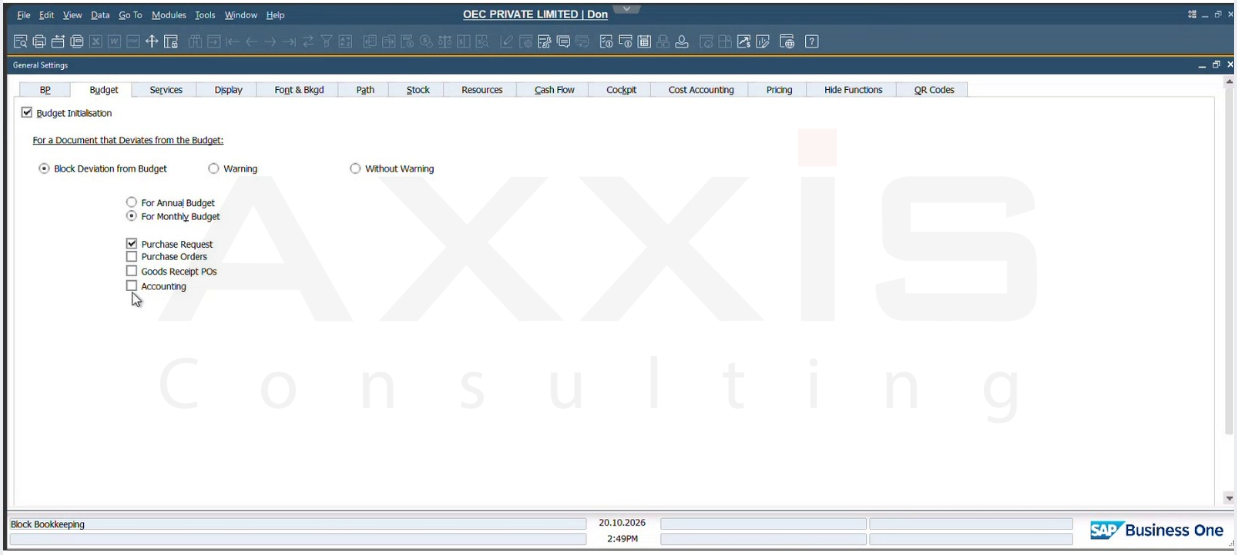
SAP Business One helps businesses set budget controls before purchases proceed.
How can SAP Business One approval workflows reduce unauthorised purchases?
Budget controls answer one question:
“Can we afford this?”
Approval workflows answer another:
“Should this person be allowed to approve it?”
SAP Business One can configure purchasing approval processes based on documents and thresholds. For example, a company could require:
- No approval below $5,000
- Purchasing manager approval from $5,000 to $20,000
- Finance director approval above $20,000
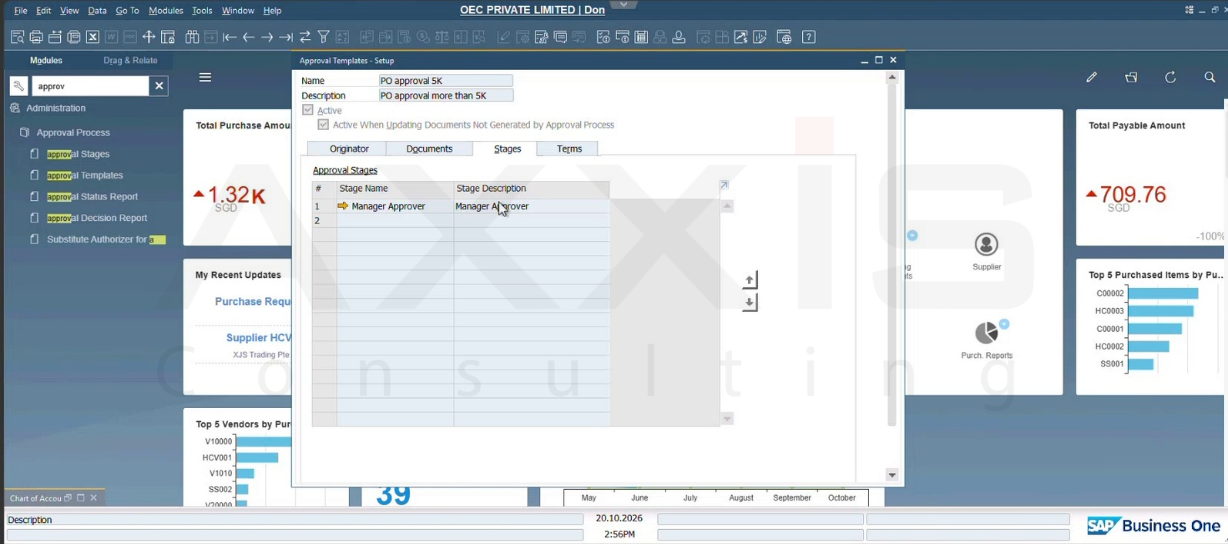
Purchase approval processes help ensure spending follows the right authorisation rules.
This approach gives purchasing teams a clear escalation path.
The process also creates accountability. The person raising the purchase order does not necessarily become the person approving it.
SAP confirms that approval processes can apply to purchasing documents such as purchase requests and purchase orders, with conditions that can block a document until the required approval takes place.
More importantly, businesses can go beyond simple amount-based approvals.
For example, an approval workflow could consider:
- Requesting department
- Cost centre
- Supplier
- Purchase amount
- Project
- Other defined business conditions
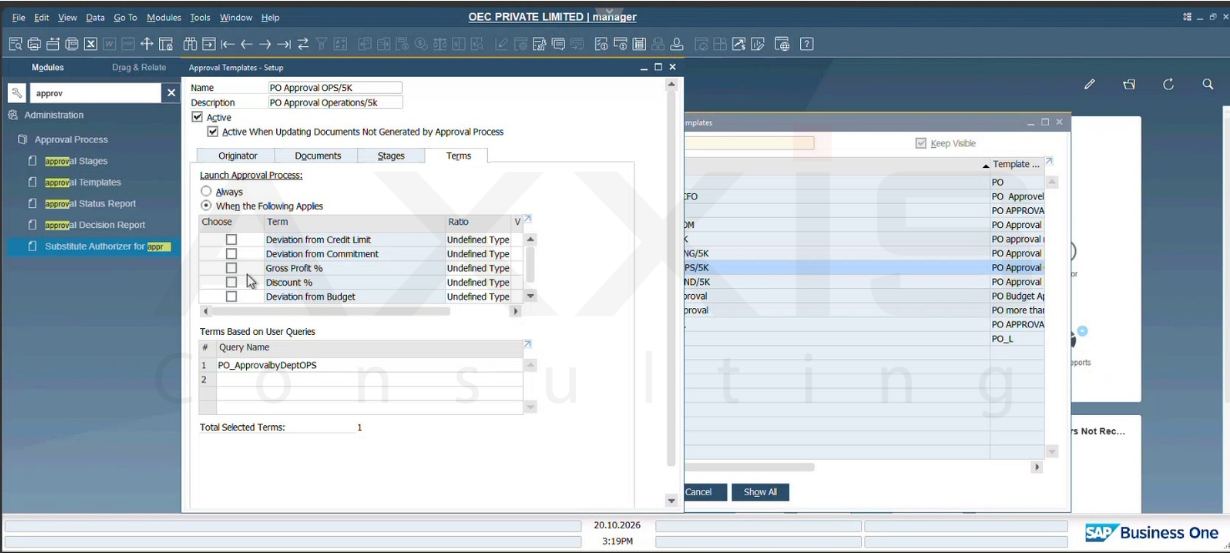
Approval templates can help route purchases according to business rules and approval requirements.
SAP Business One can support different approval routes for Operations, Engineering and R&D based on the requester’s department and purchase value.
This flexibility is especially useful for companies with more complex organisational structures, where different teams may follow different approval requirements.
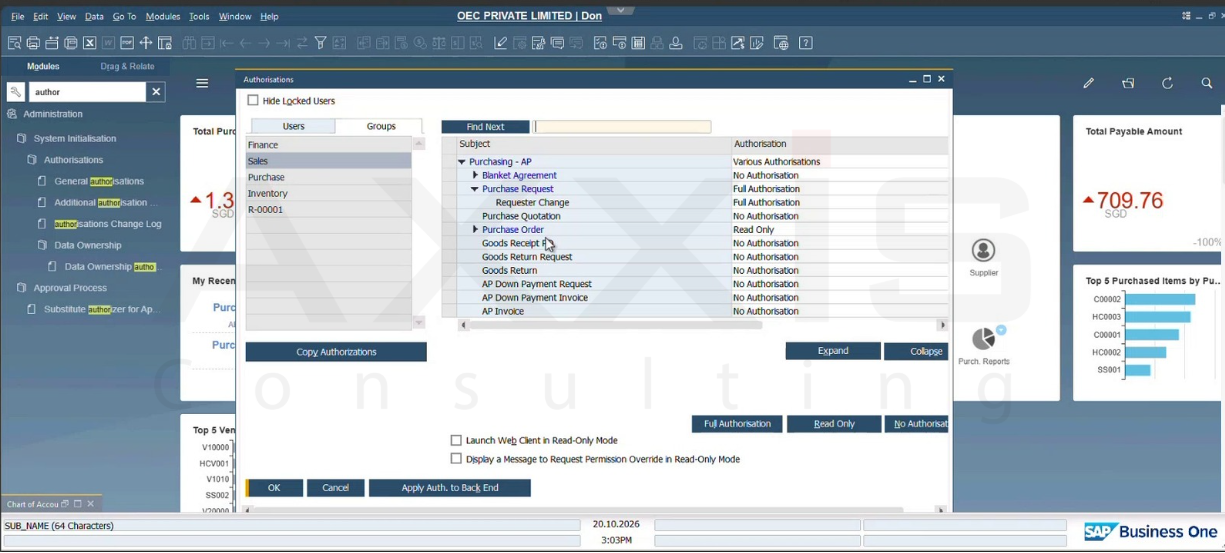
SAP Business One lets businesses control purchasing access through user authorisations.
What is maverick purchasing and how can businesses reduce it?
Maverick purchasing happens when employees buy outside the company’s approved procurement process.
It might look harmless.
A department needs something urgently, so someone contacts a supplier directly. The supplier sends the item. Later, finance receives an invoice.
The purchase solved the immediate problem — but it also bypassed the controls designed to protect the business.
Over time, these exceptions can create:
- Higher purchase prices
- Duplicate purchases
- Poor supplier visibility
- Budget overruns
- Difficult invoice matching
- Limited audit trails
SAP Business One can help businesses reduce this behaviour by enforcing purchasing policies.
For example, businesses can require a Purchase Request (PR) before creating a Purchase Order (PO), establish approval templates, apply spending thresholds and restrict users from bypassing the approval process.
Companies can also establish a policy requiring supplier invoices to reference an approved PO.
For inventory purchases, this creates a controlled flow:
Purchase Order → Goods Receipt PO → A/P Invoice
This gives finance and purchasing teams a clearer audit trail and helps connect what the business ordered with what it received and what the supplier invoiced.
SAP specifically supports these linked purchasing documents as part of the purchasing process.
How can SAP Business One help you know when to buy?
Procurement control does not mean slowing down purchasing.
In fact, the right system can help businesses buy earlier and more intelligently.
SAP Business One provides several ways to trigger purchasing, including:
1. Purchase Requests
Purchase Requests work well for one-off requirements or requests from other departments.
An employee identifies a need. The request goes through the appropriate process. The purchasing team then converts the requirement into a purchase order.
2. Stock Thresholds
For regularly consumed items, businesses can define minimum and required stock levels.
When inventory falls below the defined level, SAP Business One can alert the relevant user.
This works particularly well for consumables and other items that require steady availability.
3. Material Requirements Planning (MRP)
MRP takes the process further.
SAP Business One MRP can evaluate inventory, demand and existing supply to generate procurement recommendations. SAP’s documentation describes MRP as supporting procurement planning based on existing inventory, demands, supplies and planning parameters.
Importantly, MRP does not only apply to complex manufacturing environments.
The webinar demonstrated how businesses can use MRP with minimum stock levels to generate purchase recommendations even without a traditional production scenario.
That creates a useful shift:
Instead of asking “What do we need to buy?” after stock becomes a problem, the system can help identify what needs attention before the shortage happens.
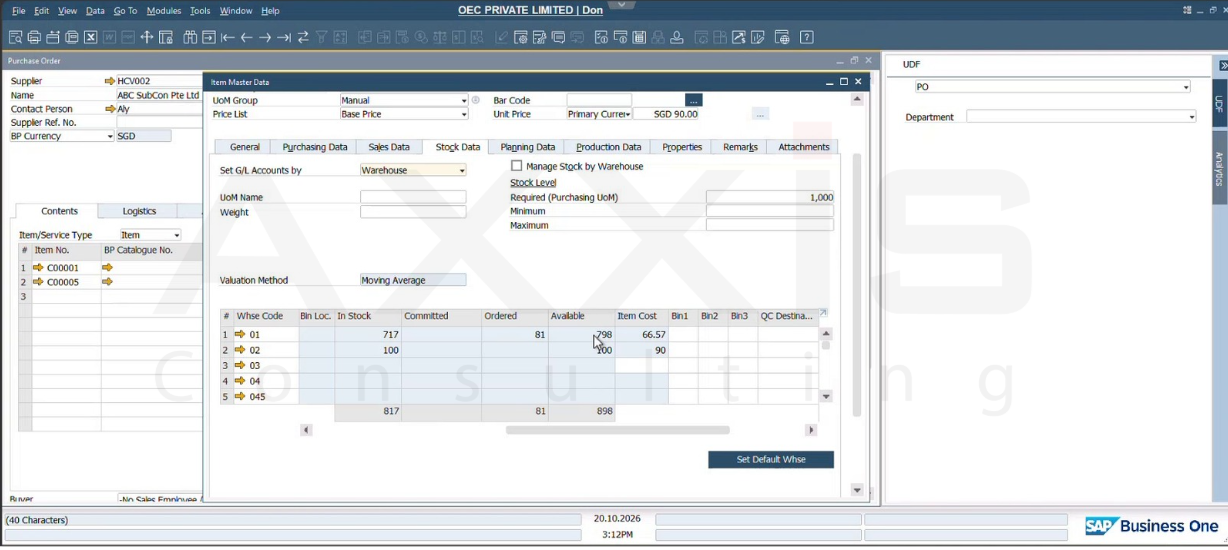
Purchasing and inventory settings help teams manage what needs to be bought and when.
How can SAP Business One improve supplier performance?
Price is only one part of supplier performance.
A supplier may offer a competitive price but consistently deliver late. Another supplier may deliver on time but have a high return rate.
So the better question is:
“Which suppliers actually perform well for our business?”
SAP Business One can combine purchasing and supplier information to give management greater visibility into spend and supplier performance.
Supplier spend tells only part of the story. To understand the true impact of your suppliers, you also need to look at delivery and fulfilment performance.
Useful metrics include:
- On-time delivery
- Fulfilment rate
- Return rate
- Total invoiced spend
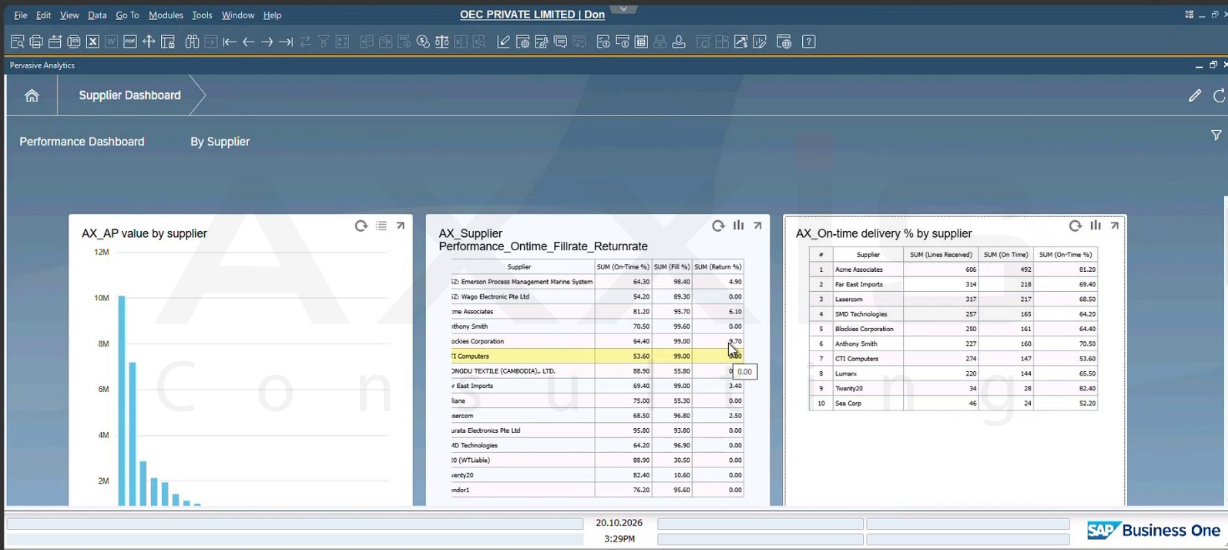
SAP Business One supplier analytics combine purchasing spend with supplier performance indicators.
For example, one supplier accounted for approximately $10.1 million in invoiced spend, making it the highest-spend supplier. However, another supplier with only around $1 million in spend delivered just 54% of orders on time. A third supplier recorded 64% on-time delivery and a 9.7% return rate.
These figures provide a much clearer picture than a simple “top suppliers by spend” report.
A supplier with lower spend can still have a significant operational impact if late deliveries, incomplete fulfilment or frequent returns disrupt your purchasing and inventory processes.
By combining spend data with supplier performance metrics, businesses can identify which suppliers truly deliver value—and which may be costing more than their invoice totals suggest.
Can SAP Business One help businesses make better buying decisions?
Yes — and this is where procurement becomes more strategic.
Businesses can use Request for Quotation processes to compare supplier offers before selecting a vendor. SAP Business One also supports quotation comparison and purchase orders based on the selected offer.
Businesses can also use blanket agreements to establish agreed pricing and quantities for a defined period.
Together, these capabilities help purchasing teams move beyond:
“Which supplier gave us the lowest price?”
Instead, the question becomes:
“Which supplier gives us the best overall commercial outcome?”
That could include price, delivery reliability, fulfilment, return rates and agreed purchasing terms.
In other words, lower procurement costs do not come from approvals alone. They come from better buying decisions.
What does procurement visibility look like in SAP Business One?
When procurement data sits across spreadsheets, emails and disconnected systems, management spends too much time collecting information.
SAP Business One brings purchasing information into the same business management environment.
The procurement cockpit provides a consolidated view of key purchasing information, including:
- Invoiced spend
- Goods received but not yet invoiced
- Goods returns
- Total payable amounts
- Purchase trends
- Supplier performance
This gives purchasing teams a clearer view of current spend, outstanding liabilities and supplier activity in one place.
SAP Business One also provides analytics in the HANA environment, including supplier dashboards and purchasing KPIs, helping businesses turn procurement data into actionable insights.
This creates a stronger management loop:
See the spend → identify the problem → investigate the supplier or process → take action.
That is much more useful than discovering a procurement problem at the end of the financial year.
What should businesses consider before implementing SAP Business One procurement?
Technology alone will not fix a weak procurement process.
Before implementation, businesses should define their procurement policies clearly.
Start with these questions:
- Which departments can raise Purchase Requests?
- Who can issue Purchase Orders?
- What spending thresholds require approval?
- Which purchases require multiple approvals?
- When can employees make emergency purchases?
- Should every supplier invoice reference a PO?
- What stock levels should trigger purchasing?
- Which supplier KPIs matter most?
- Who should receive procurement alerts?
- Which purchasing reports does management need?
Once these rules are clear, SAP Business One can help translate them into system controls, workflows and visibility.
That is also where the experience of an implementation partner matters.
How can Axxis Consulting help with SAP Business One procurement?
Axxis Consulting works with businesses across Singapore, Malaysia and the wider region to implement and support SAP solutions. The company is an SAP Platinum Partner and member of United VARs, with expertise across SAP ERP and related solutions.
For SAP Business One, Axxis Consulting focuses on helping businesses move beyond basic accounting and disconnected processes.
Its SAP Business One offering covers purchasing and inventory management, including purchase requests, purchase orders, goods receipts, supplier analysis, inventory planning and accounts payable processes.
The key takeaway is simple: your procurement system should reflect how your business actually buys.
Axxis Consulting can help businesses assess their existing procurement processes, identify control gaps and determine how SAP Business One can support their purchasing requirements.
FAQs About SAP Business One Procurement
SAP Business One procurement refers to the purchasing capabilities within SAP Business One that help businesses manage purchasing activities such as purchase requests, supplier quotations, purchase orders, goods receipts, supplier invoices, approvals and procurement planning.
Yes. SAP Business One supports approval processes for purchasing documents, including purchase requests and purchase orders. Businesses can configure approval conditions based on defined thresholds and other business rules.
Yes. Businesses can use purchase requests, approval workflows, permissions and PO-based invoice processes to strengthen purchasing controls and reduce purchases made outside the approved process.
Yes. SAP Business One MRP can generate procurement recommendations based on inventory, demand, supply and defined planning parameters.
Yes. Purchasing data can support analysis of supplier spend and performance. Businesses can evaluate indicators such as delivery, fulfilment and returns to identify suppliers that may be creating additional cost or operational risk.
Better procurement starts with better visibility
Procurement should not be treated as simply “the department that buys things.”
It directly affects margins, inventory, cash flow and customer fulfilment.
With SAP Business One procurement, businesses can introduce practical controls before purchases happen, automate purchasing triggers when stock levels change, route approvals to the right people and analyse supplier performance after the purchase.
Most importantly, the system helps turn procurement data into decisions.
You can see where the money goes.
You can identify which suppliers perform well.
You can spot unnecessary purchasing.
And you can build a purchasing process that supports growth instead of creating more administrative work.